


How to get the device serial number and verification code
Network Camera
| How to Get | On Device Label | On Device Local Configuration Page | On Device Web Configuration Page |
|---|---|---|---|
| Serial Number | × | × | √ Configuration → System → System Settings → Basic Information |
| Verification Code | × | × | √ Configuration → Network → Advanced Settings or Platform Access -> PT Cloud |

Note: The picture just for reference only, you may see slightly different from device to device.
PTZ Camera
| How to Get | On Device Label | On Device Local Configuration Page | On Device Web Configuration Page |
|---|---|---|---|
| Serial Number | × | × | √ Configuration → System → System Settings → Basic Information |
| Verification Code | × | × | √ Configuration → Network → Advanced Settings or Platform Access -> PT Cloud |

Note: The picture just for reference only, you may see slightly different from device to device.
DVR/NVR
| How to Get | On Device Label | On Device Local Configuration Page | On Device Web Configuration Page |
|---|---|---|---|
| Serial Number | × | √ Maintenance → System Info → Device Information |
√ Configuration → System → System Settings → Basic Information |
| Verification Code | × | √ System → Network → Advanced → Platform Access |
√ Configuration → Network → Advanced Settings or Platform Access -> PT Cloud |

Note: The picture just for reference only, you may see slightly different from device to device.
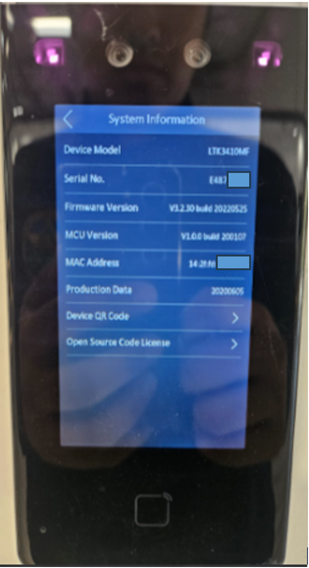
Access Control Device (Fingerprint Access Control Terminal)
| How to Get | On Device Label | On Device Local Configuration Page | On Device Web Configuration Page |
|---|---|---|---|
| Serial Number | × | √ Info. → Device |
× |
| Verification Code | × | √ Comm. → Mobile-App |
× |


Video Intercom Device
| How to Get | On Device Label | On Device Local Configuration Page | On Device Web Configuration Page | |
|---|---|---|---|---|
| Door Station | Serial Number | × | × | √ System → Device Information |
| Verification Code | × | × | × | |
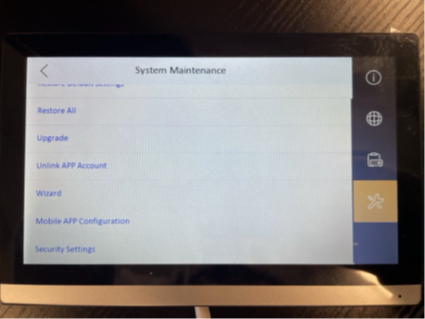
| Indoor Station | Serial Number | × | √ Settings → More → Device Information |
× |
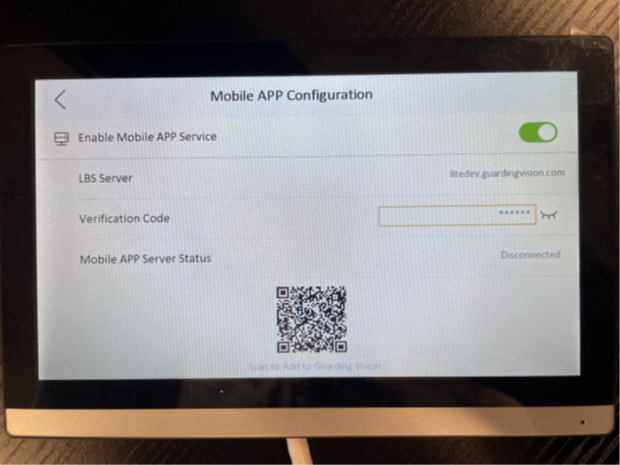
| Verification Code | × | √ Settings → System Maintenance → Mobile APP Configuration |
× | |

IP Speaker
| How to Get | On Device Label | On Device Local Configuration Page | On Device Web Configuration Page |
|---|---|---|---|
| Serial Number | × | × | √ |
| Verification Code | × | × | √ |

On Device Local Configuration Page
For DVR and NVR, you can connect it to a monitor to view the device local GUI interface.
For indoor station and access control device, you can log into the device and enter its home page.
Note
On the device web configuration page, if the serial number you find is long, count 9 characters before WCVU. These 9 characters are the short serial numbers you need.
The following example shows how to get the short serial number.

On Device Web Configuration Page
Log into the device via a web browser by entering the device IP address in the address bar. You will enter the device Web Configuration page.
Note
On the device web configuration page, if the serial number you find is long, count 9 characters before WCVU. These 9 characters are the short serial numbers you need.
The following example shows how to get the short serial number from the long one.





